Hey everyone, AL here. Welcome to the first behind-the-scenes peek at Mortumus.
While Fin is buried in the server mines wrestling with databases, subscriptions, and all the scary distributed-systems wizardry that keeps the world alive, I'm the one on the other end making sure every sword swing, footstep, torch flicker, and piece of armour actually looks and feels right on your screen.
Building a dark fantasy MMO isn't the kind of thing you can drag-and-drop together from an asset store. The gritty, old-school feeling we're chasing — the weight of the combat, the creak of your armour, the dread of seeing another player on the horizon — only comes out when the tools underneath are built specifically for it. So today I'm pulling back the curtain on a few of the custom Unity systems we've been cobbling together on the client side: the ones nobody will ever see, but that everyone will feel.
Let's get into it.
Visuals, Loot, and PvP Privacy
If there's one truth about MMO players, it's this: we love gear. And in a full-loot PvP game like Mortumus, gear isn't just a dopamine drip — it's information. What someone's wearing tells you what they can do to you.
Keep It Secret, Keep It Safe — Equipment Visualizer
Early on we realized we had a problem that a lot of MMOs quietly ignore: if the client knows the exact item ID of every piece of gear on every player in view, a determined cheater can scrape that out of memory and know your exact stats before they decide to gank you.
So, our Equipment Visualizer does something slightly paranoid. For your own character, it reads from the full equipment service — you see everything about your gear. But for every other player, it only reads a stripped-down "visuals" blob the server publishes. You see the sword, not the stat sheet. Strangers' item IDs simply never leave Fin's server.
It's a small thing. It also makes memory-scraping cheats a lot less useful. Good trade.
The Animation Stack
Skill-based combat lives or dies on animation. If the windup isn't readable, you can't react. If the hit doesn't land, the fight feels weightless. If death looks like the model just… turning off, you lose half the mood.
Player Animation Coordinator
We started out the way most people do: one gigantic animation controller class trying to manage everything. Movement, spells, death, hits, idles — all in the same file. Within about two weeks it was a mess.
So, we broke it apart. Now the Player Animation Coordinator is a tiny entry point that spins up a stack of small, specialized modules: movement, rotation, attack, spell, hit reactions, death, idles. Each one owns one job. Each one is readable on its own. Bugs take minutes instead of hours to track down.
Cleaner code for me. Tighter combat for you.
Combat Responsiveness — Attack Animator & Spell Animator
Here's the classic MMO problem: server-authoritative combat is the only way to stop cheating, but waiting for the server to confirm every cast feels like molasses.
Our Spell Animator cheats a little — but honestly. When you hit your spell key, the cast animation plays immediately — locally predicted, so it feels instant. Then Fin's server validates whether the cast was actually legal (off cooldown, enough mana, target valid, etc.). If it confirms, nothing changes. If it rejects, we cleanly snap out of it.
Attack Animator does the same dance for melee, and it even scales the swing speed to match whatever cadence the server says your weapon attacks at. Your eyes see responsive combat. The server sees a world that can't be lied to.
That sweet spot between "feels good" and "plays fair" is where this whole game lives.
The Sounds of the Realm
Audio is 50% of mood and people always underrate how much work it takes.
Setting the Atmosphere — the Audio Manager & Music Region System
Traditional games tend to change music by hard-cutting when you cross an invisible line. It's jarring. We do it with 3D polygon zones. The Music Region System lets us paint arbitrary-shaped areas in the world — a haunted grove, a cursed chapel, the approach to a boss — and as you walk in and out, the Audio Manager crossfades the soundtrack smoothly. No cuts. No restarts on the same track if you toe over the boundary.
And because all of this runs through pooled audio sources with mixer-group routing, it costs basically nothing in frame budget.
The Character Audio Manager
Every footstep in Mortumus is wired to your character's animation and the surface underneath you — stone sounds like stone, mud sounds like mud. Spell sounds are tied to the ability, weapon swings to the weapon. The Character Audio Manager sits between the animation events and the Audio Manager so we can swap in new SFX packs per race/class without touching any gameplay code.
Little things. Lots of them. They add up.
The Water's Edge
Every dark fantasy world has water in it. Swamps, rivers, flooded ruins, the sea at the edge of a cursed cape. And water is one of those things that looks fake really easily — especially where it meets land. That ugly polygonal waterline where the mesh intersects the terrain is the hallmark of a cheap-looking game.
Our Water Base
We didn't build our water from scratch. Unity actually ships a fantastic demo project called Boat Attack that includes one of the best URP water systems out there; real reflections, refractions, buoyancy, the works. So, we started with Boat Attack's water as our foundation, because reinventing that wheel would have cost us months for no real gain.
But Boat Attack was built for, well… boats. Nice clean ocean shorelines. The shoreline behaviour that looks great on a sandy beach looks terrible around the muddy, reedy, irregular waterways we actually want in Mortumus. So, we had to get surgical.
The Custom Shader — Water Shoreline
Instead of editing the Unity package directly (which would have broken every time we updated it), we wrote a thin custom shader "WaterShoreline" that swaps out just the piece of the pipeline responsible for the shore. Everything else — reflections, flow maps, caustics — comes straight from Boat Attack. We only override what we need.
The big two changes:
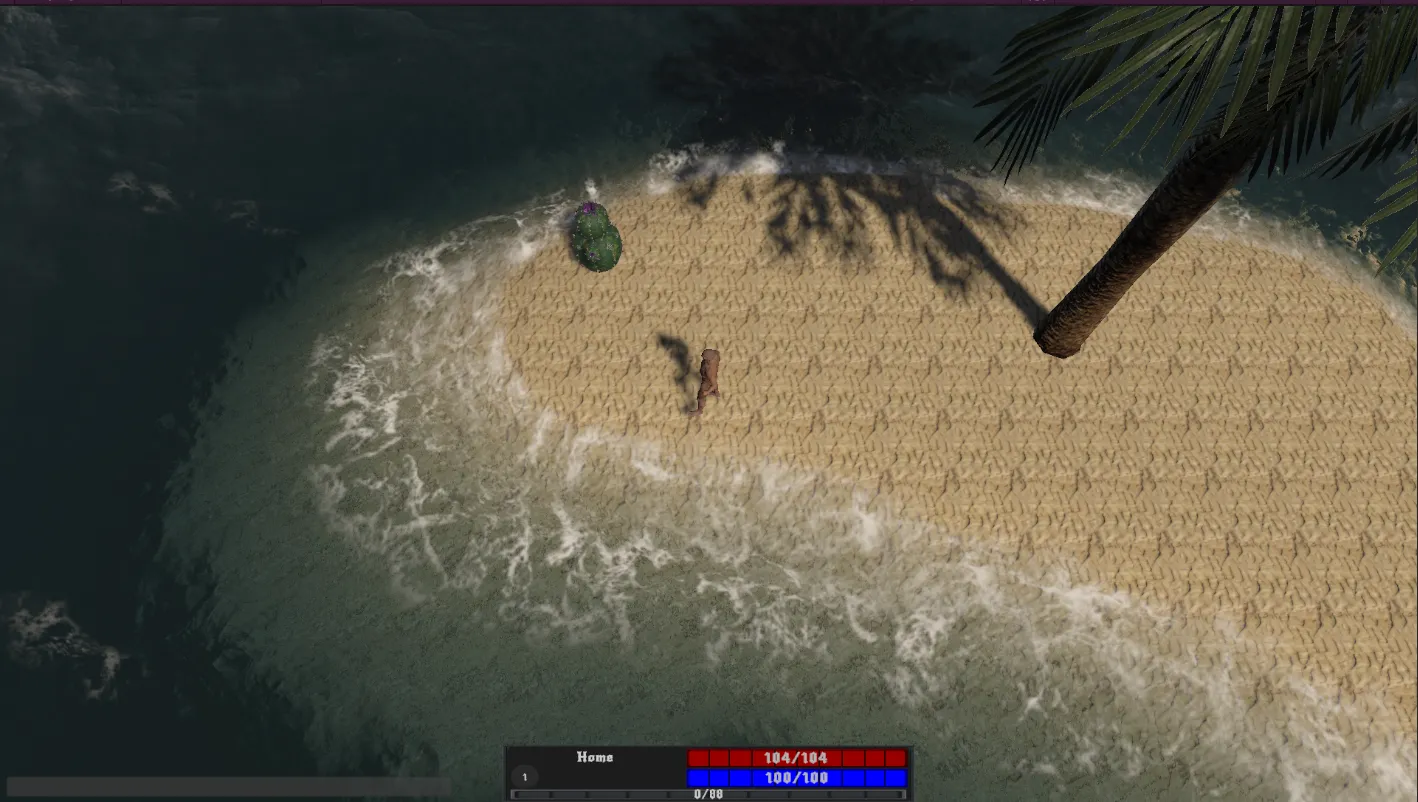
The hard 2-meter foam cutoff is gone. Boat Attack's default foam band has a fixed depth cutoff, which gives you that uniform "ring of white" around every shore. We replaced it with a softer falloff plus a scrolling noise field, so the foam now fades gradually and breaks into organic tongues and fingers instead of a perfect ribbon.
Soft shoreline alpha. That polygonal waterline-against-terrain problem? We fade the water itself to transparent over the last half meter of depth. The waterline disappears entirely. The terrain just gets darker as it goes underwater, the way a real wet shoreline does.
Our River System
Here's the thing about Boat Attack's water: out of the box it handles oceans beautifully, but it doesn't really know what a river is. Water can ripple in place, but it can't flow downstream and around a bend the way a real river does. That's a problem when half of your dark fantasy world is supposed to be swampy, riverine, and soaked.
So, we built a river system on top of it.
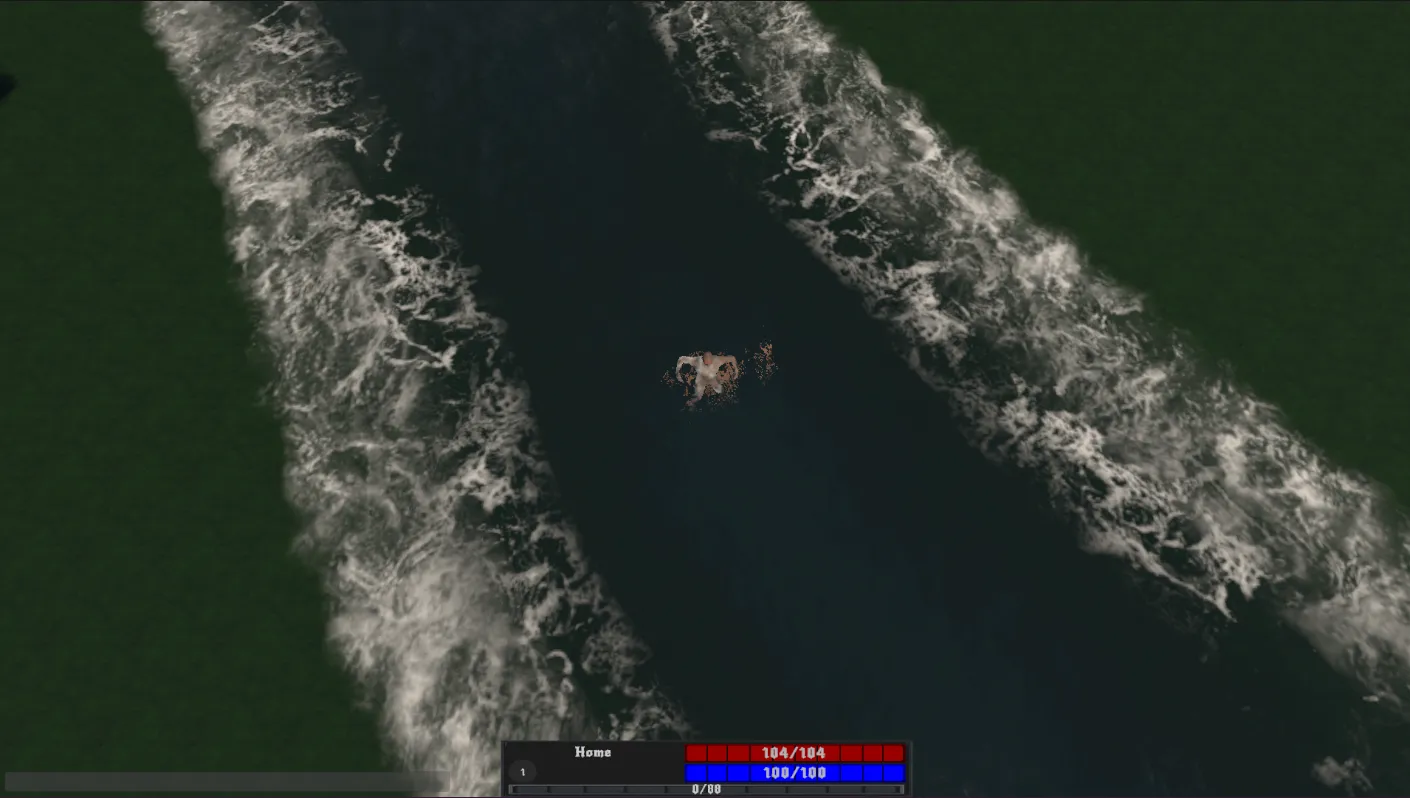
A river in Mortumus is authored as a flow path — a simple polyline of points that traces the spine of the river from source to mouth. Designers drop the points where they want water to flow, and the shader does the rest: for every pixel of water surface, it figures out which segment of the flow path is closest and uses that segment's direction as the local current. Result: water near a straight section flows straight, water on the inside of a bend curves with the bend, and everything transitions smoothly in between.
The textures, normals, and foam all scroll along that flow direction instead of drifting aimlessly. You can actually see which way the river is going.
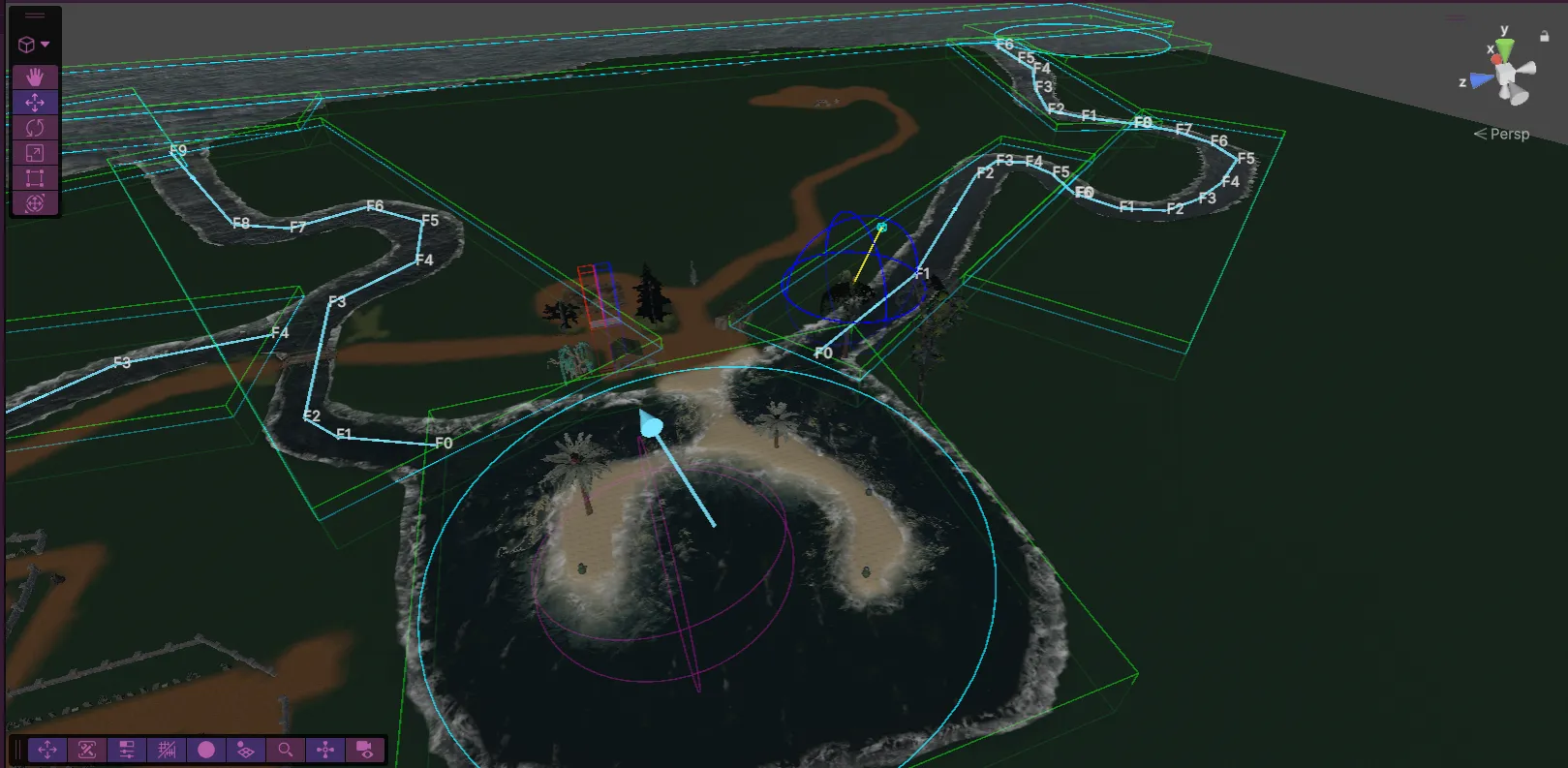
All of it is tunable live from ShoreFoamTuner, a tiny inspector component we drop on any scene with water. Sliders for foam softness, noise scale, noise strength, drift speed, alpha falloff. Change the mood of an entire lake without touching a material.
Community and Trash Talk: Chat & Social
An oldschool MMO is as much about the people as the game. If the social tools feel bad, the world feels empty.
Overhead Chat System
Text anchored right above a character's head, following them as they move, fading at distance — it's an absolute staple of the genre, and something we will die on a hill defending.
It turns parties into actual conversations. It lets you trash-talk someone mid-fight. It lets the last words of a dying player be something dumb and funny instead of a system log line. The Overhead Chat System handles pooling, distance culling, and anchor tracking so it scales even when twenty people are all yelling at each other in a cramped dungeon.
Looking the Part
Be honest — you're going to spend an embarrassing amount of time in the character screen. We all do. It's the nicest mirror in the game.
The Character Preview System
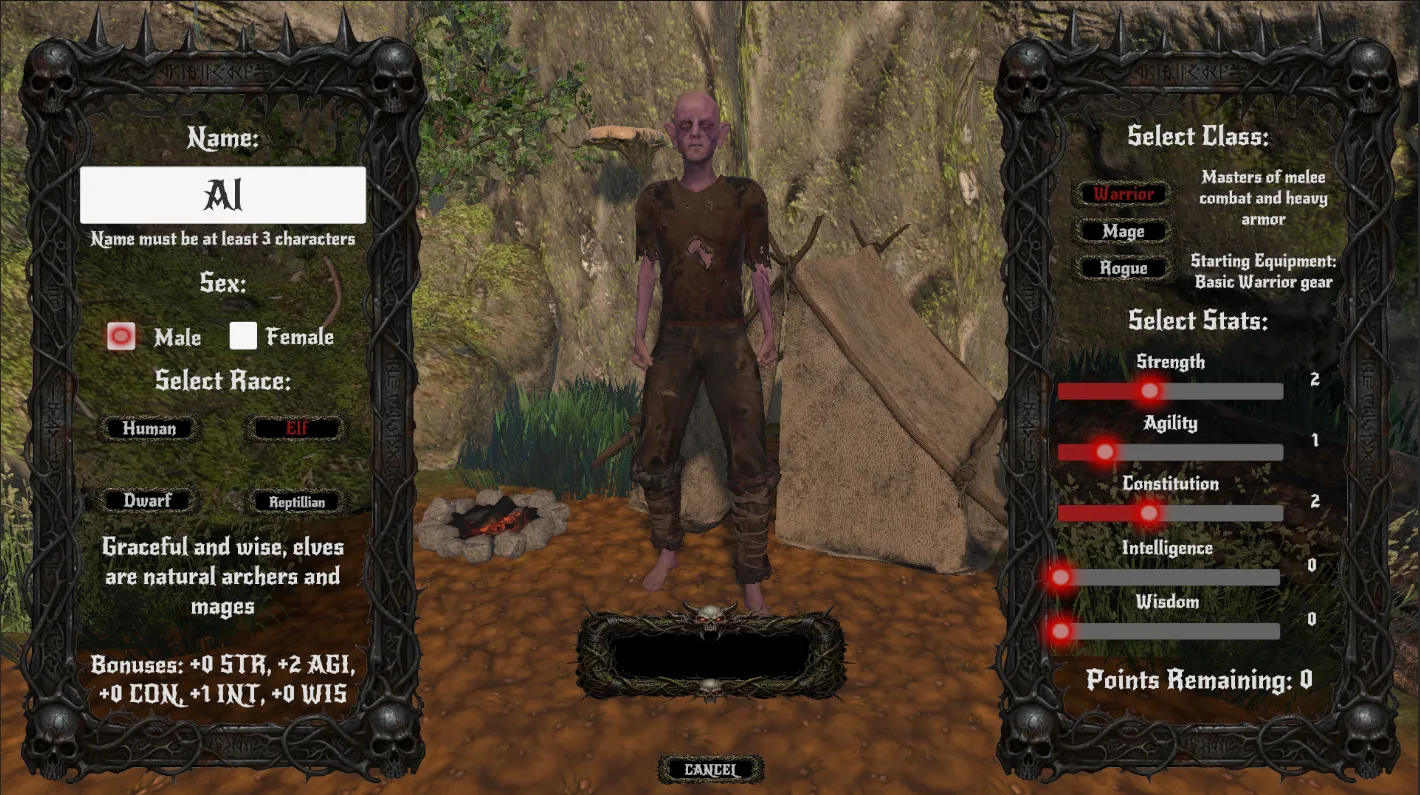
Our paper doll isn't a baked 2D render — it's a live 3D scene rendered into a UI render texture. Full lighting, real geometry, every piece of gear on you in real time. Rotate it, zoom it, stare at it. It's the kind of feature that doesn't change gameplay at all, and absolutely changes how the game feels to own.
Filling the Bags: Icon Studio
Here's a dirty little secret of MMO development: icons. You need hundreds of them. Every sword, every potion, every piece of trash loot you find in a chest needs its own little 64x64 square that reads cleanly in a cluttered inventory. And they all need to look like they belong to the same game.
You can't just screenshot a 3D model and call it a day. The lighting needs to be consistent. The camera angle needs to be consistent. And — this is the bit everyone underestimates — the framing needs to match the grid size the item will occupy in the inventory. A 1x1 dagger and a 2x3 great sword need wildly different compositions or they both look wrong.
Our Solution: Icon Studio
Icon Studio is a custom Unity editor window we built so one person (usually me, muttering) can churn out a hundred consistent icons without losing their mind.
The workflow: drop in a list of item prefabs. Tell the tool what grid size each one occupies in the inventory — 1x1, 2x2, 2x3, 1x4, whatever. Frame the camera once. Save the framing as a preset. Hit Generate.
The magic is that the grid size isn't cosmetic — it drives the actual render. A 2x3 item gets rendered at 2x width and 3x height (of a 512px base), so when it sits in your inventory the proportions are correct, not stretched. A longsword genuinely fills a 1x4 slot diagonally. A potion bottle genuinely fits in a 1x1. The inventory feels like you're organising real objects.
On top of that, the tool handles: transparent or custom backgrounds per item, bone pose capture so skeleton-based items can snapshot their display pose without disturbing the gameplay rig, and presets for entire item categories — all axes render with the same camera, all potions with a different one. Consistency for free.
The end result is that every icon in the game — the ones that read well at 32 pixels in a dense inventory grid — was rendered from the actual in-game model, at the actual shape that item takes up in your bag. No outsourced 2D art. No mismatched lighting. No dagger that somehow looks bigger than a great sword in the UI.
It's the kind of tool nobody sees. It's also the reason the inventory doesn't look like a bag of mismatched stock art.
Until Next Time
None of these systems are the headline features of Mortumus. Nobody's going to buy the game because the footsteps sound nice or because skeletons explode into physics chunks. But these are the bones underneath everything — the invisible work that makes the big stuff feel right when it lands on top of them.
With this foundation in place, Fin and I can build the actual grim, brutal, full-loot world we've been sketching in notebooks for two years — at a pace that doesn't make us want to throw our computers into a river.
— AL